Free prompt
Build your own AI City: the free master prompt
Watch your AI agents work in a living 3D city: every agent is a citizen, every kind of work has its own building, and everything that moves comes from what your agents really do. Copy the prompt below into Claude Code and it builds the city with you, one milestone at a time.
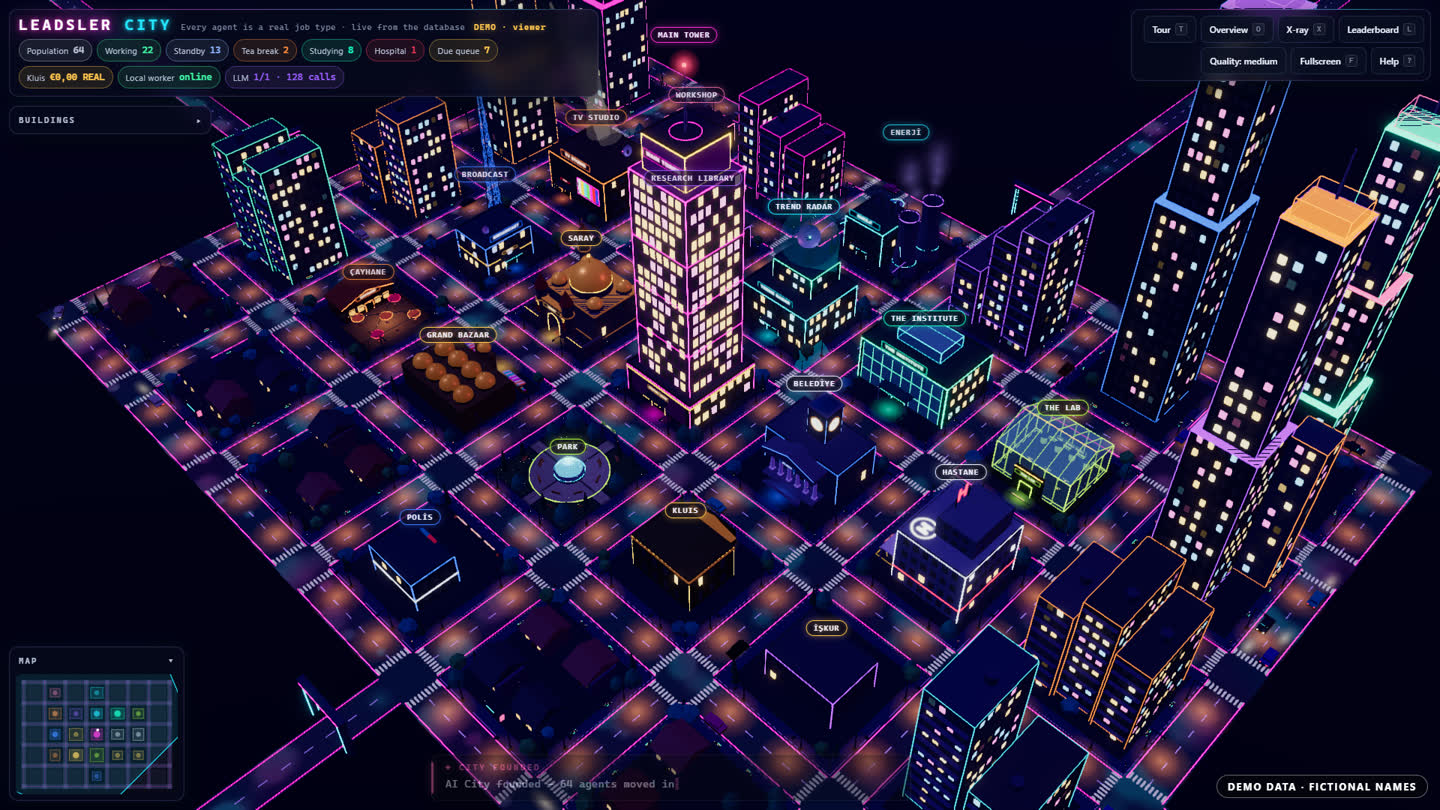
What you get
- A neon 3D city in your browser (three.js): your agents walk to the building for their task, sit at a desk while they work and take a break when they are done.
- Live from real activity: Claude Code sends its events (session start, tool use, subagents, stop) to your city through hooks, or the city reads your own job queue.
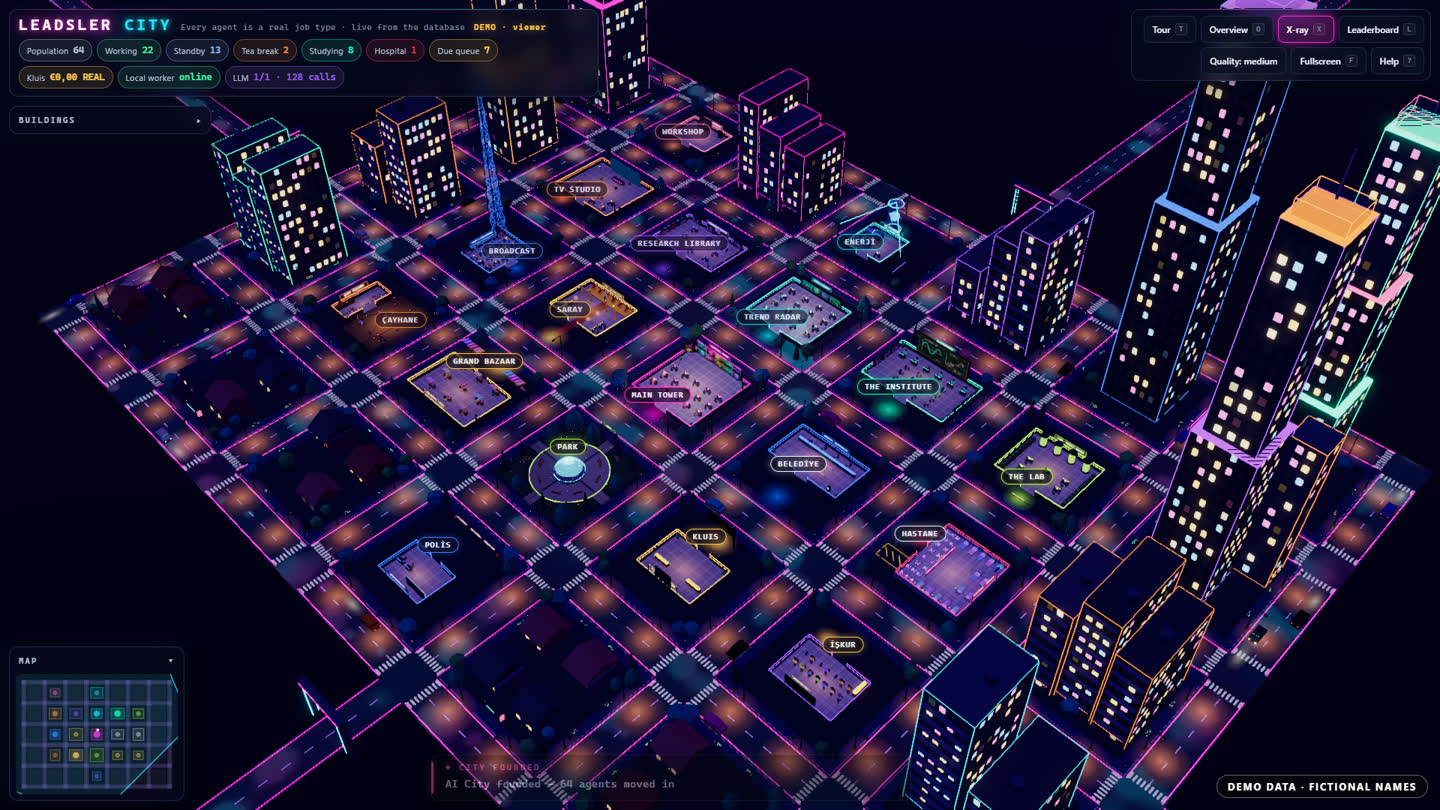
- X-ray to look inside every building, a cinematic tour, a leaderboard, a minimap and a panel per agent with its real runs, success rate and streak.
- Private by default: no prompts, file contents, commands, paths or secrets are stored, only event types, timings and success or failure.
- Demo mode with a visible “demo data” badge, so you can take screenshots before you connect anything.
How to use it
- Open Claude Code in an empty folder (or in the project whose agents you want to see).
- Copy the prompt with the button below and paste it as your first message.
- Answer its five questions: where the activity comes from, who may see the city, where it runs, your departments and the style.
- Go milestone by milestone: first the city on demo data, then the live connection, then the polish. Check each milestone before you say “go”.
- Paste the hooks snippet it writes into your Claude Code settings and start a session: your agents move in.
The master prompt
You are a senior full-stack and three.js engineer working in this repository with me. Build **AI City**: a live, game-like 3D city in the browser where every one of my AI agents is a citizen and every kind of work has its own building — and where everything that moves, glows or shows a number is driven by **real activity** from my agents, never by made-up numbers.

Work in small, verifiable milestones. After each milestone: run the tests, start the app, tell me exactly what to open and what I should see, and wait for my "go" before the next one.

## 0. First, ask me (one message, max 5 questions)

Before writing code, look around this folder, then ask me only what you cannot infer:

1. **Where the activity comes from:**
   - (A) my Claude Code sessions (main agent + subagents), streamed in through Claude Code hooks;
   - (B) an existing job queue / database / cron system I already run;
   - (C) both.
2. **Who may see the city:** only me on this machine, or a small team behind a login.
3. **Hosting:** local only (`localhost`), or also a small server/VPS later.
4. The 4–8 **departments** I want as buildings (offer sensible defaults: Headquarters, Research Library, Workshop, Studio, Post Office, Library of Tests, Hospital, Park).
5. **Style:** keep the default neon-night look unless I describe something else.

Then propose the plan in 10 lines and wait for my "go".

## 1. Non-negotiable rules

- **Real data only.** Every count, state, timer and chart comes from recorded events or my own systems. If a value is unknown, show "—", not a guess. Game mechanics (XP, levels, badges, streaks) are computed from real counts and labelled as game stats.
- **Demo mode is labelled.** The app ships with a demo-data generator for screenshots and first runs. Whenever demo data is shown, a visible badge says `DEMO DATA · FICTIONAL NAMES`. Demo and live data never mix.
- **Privacy by default.**
  - Never store or display prompts, file contents, tool inputs/outputs, command lines, environment variables, tokens or file paths. From each event keep only:
    - the timestamp;
    - the event type;
    - session / agent / subagent ids;
    - the agent type;
    - the tool **name**;
    - success or failure;
    - the duration.
  - Drop everything else on arrival, before it touches disk or a log.
- **Security.**
  - The ingest endpoint requires a secret token (bearer header, constant-time compare) and rate-limits per token.
  - The page itself is read-only. No secrets ever reach the browser.
  - Bind to `127.0.0.1` unless I chose a server.
  - All config comes from environment variables, with a `.env.example`; `.env` is in `.gitignore`.
- **Never slow my agents down.** Ingest answers `204` within milliseconds and processes asynchronously. If the city is down, my agents keep working: hooks are non-blocking.
- **Plain, boring stack:** TypeScript, Node 22+, one small HTTP server, SQLite (or my existing Postgres), three.js on the client, bundled with esbuild. No heavy frameworks unless the repo already uses them.

## 2. Architecture

```
agents ──(hook events / job rows)──▶ ingest ──▶ event store ──▶ state reducer ──▶ GET /api/city ──▶ 3D client (polls, or live via SSE)
```

- **Server:**
  - `POST /api/ingest` (token-protected) accepts events.
  - `GET /api/city` returns the full `CityState`.
  - `GET /api/city/stream` (optional) pushes changes with Server-Sent Events.
  - The page shell is served at `/`.
- **Event store:** append-only table `events(id, at, kind, session_id, agent_id, agent_type, tool, ok, duration_ms)`, with retention (default: 30 days) and a daily cleanup.
- **State reducer:** a pure function `reduce(events, now) → CityState`, fully unit-tested. Derived values are cached and recomputed incrementally.
- **Client:** ES modules bundled to one file. three.js scene, HUD in plain HTML/CSS on top of the canvas.

### The `CityState` contract (authoritative; the client relies on every field)

```ts
type AgentState = 'working' | 'queued' | 'idle' | 'break' | 'failed' | 'offline';
interface CityState {
  generatedAt: string;               // ISO time
  demo: boolean;                     // true → the UI shows the DEMO DATA badge
  city: { name: string; population: number; counts: Record<AgentState, number> };
  buildings: Array<{ id: string; name: string; subtitle: string; activity: number /* 0..1 */; agents: string[] }>;
  agents: Array<{
    id: string; name: string; kind: 'main' | 'subagent' | 'job';
    building: string; state: AgentState; since: string;      // when the state began
    doing: string | null;            // a short, SAFE label such as "Running tests" (never raw input)
    stats: { runs7d: number; ok7d: number; failed7d: number; streak: number; lastDurationMs: number | null };
    level: { level: number; title: string; xp: number; nextAt: number | null }; // game stats from real counts
  }>;
  events: Array<{ id: string; at: string; tone: 'good' | 'warn' | 'bad' | 'info'; title: string; text: string; agentId?: string; building?: string }>;
  leaderboard: Array<{ agentId: string; name: string; ok7d: number; xp: number; level: number }>;
}
```

## 3. Data sources

### (A) Claude Code (verify against the current hooks docs before you write the config)

- Use Claude Code's HTTP hooks (`"type": "http"`). Each one POSTs the hook's JSON to `/api/ingest` with `Authorization: Bearer $CITY_TOKEN`; list `CITY_TOKEN` in `allowedEnvVars`. Use a short `timeout` (2–3 s).
- If my version lacks HTTP hooks, fall back to a command hook with `"async": true` that pipes stdin to `curl`.
- Subscribe to these events:
  - `SessionStart`, `UserPromptSubmit`;
  - `PreToolUse`, `PostToolUse`, `PostToolUseFailure`;
  - `SubagentStart`, `SubagentStop`;
  - `Stop`, `SessionEnd`, `Notification`.
- Map events to the city:
  - `SessionStart` → a citizen walks into Headquarters (the main agent; one per session).
  - `UserPromptSubmit` → the main agent gets a new task (state `working`, a short label from the event *type*, never the prompt).
  - `PreToolUse` → the agent walks to the building for that tool and works at a desk:
    - shell → Workshop;
    - edit/write → Studio;
    - web → Research Library;
    - tests → Library of Tests;
    - everything else → Headquarters.
    - Make the mapping a config file.
  - `PostToolUse` → work done (green pulse, +XP).
  - `PostToolUseFailure` → a short trip to the Hospital (red pulse). Three failures in a row → the agent stays in the Hospital until the next success.
  - `SubagentStart` → a new citizen spawns next to its parent and walks to its building. Use `agent_id` / `agent_type`; the name comes from the agent type.
  - `SubagentStop` → it returns to Headquarters and hands over (a small "delivery" animation).
  - `Stop` → the main agent takes a break in the Park until the next prompt.
  - `SessionEnd` → it goes home (offline).
  - `Notification` → a speech bubble ("needs you") above the agent; it also appears in the ticker.
- Write the exact `settings.json` snippet into `README.md` for both user-level and project-level installs, with a one-line test command.

### (B) My own job system

Write a small adapter that reads my job table or queue every few seconds and turns rows into the same events:
- queued → `queued`;
- started → `working`;
- succeeded / failed → done / hospital;
- schedules → "next run in …" on the agent's panel.

Never write to my job system.

## 4. The 3D world

- **Look:** a neon city at night. Dark ground, glowing street grid, lit windows, soft bloom, light fog. Low-poly buildings with a distinct silhouette per department, each with a readable sign.
- **Layout:** a grid of lots from a single config file (id, name, style, capacity, color).
- **Citizens:** small stylised characters with a floating name label and a state dot (working = green, queued = amber, failed = red, idle = grey). They walk the streets between buildings with simple path-finding on the street grid and sit at desks when working.
- **Building activity:** windows brighten with the share of its agents that are working, and a building with failures gets a red beacon.
- **Camera:**
  - Overview (`O`), Cinematic Tour (`T`: glide in, slow orbit, next building), X-ray (`X`: roofs open so you see who works inside), Leaderboard (`L`), Map (`M`), Help (`?`), number keys `1–9` to jump to a building.
  - Mouse: drag to pan, right-drag to rotate, wheel to zoom.
  - Touch works too.
- **HUD:**
  - Top-left: city name, population and a chip per state with live counts.
  - Top-right: Tour / Overview / X-ray / Leaderboard / Quality / Help.
  - Bottom: the event ticker. Bottom-left: the minimap.
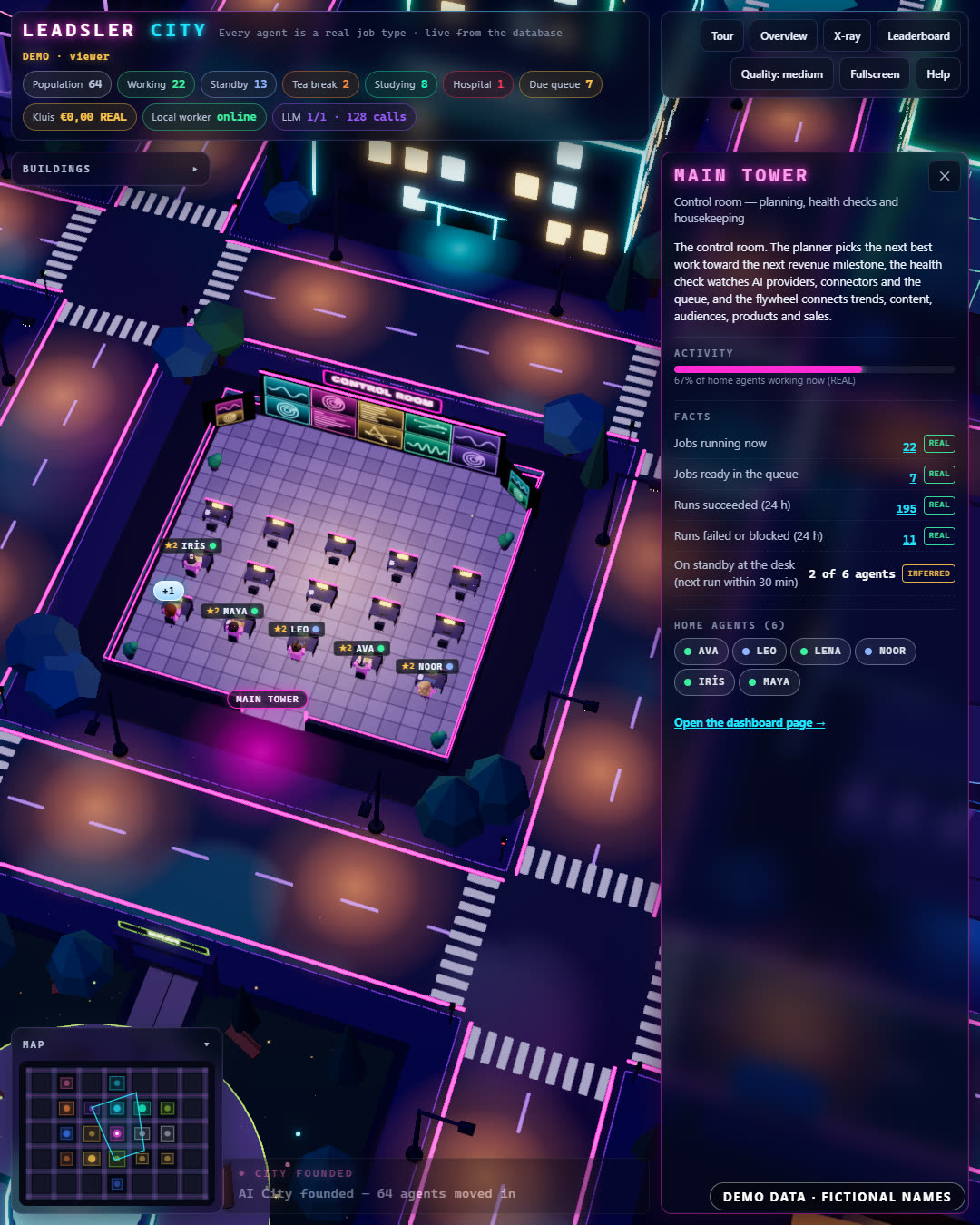
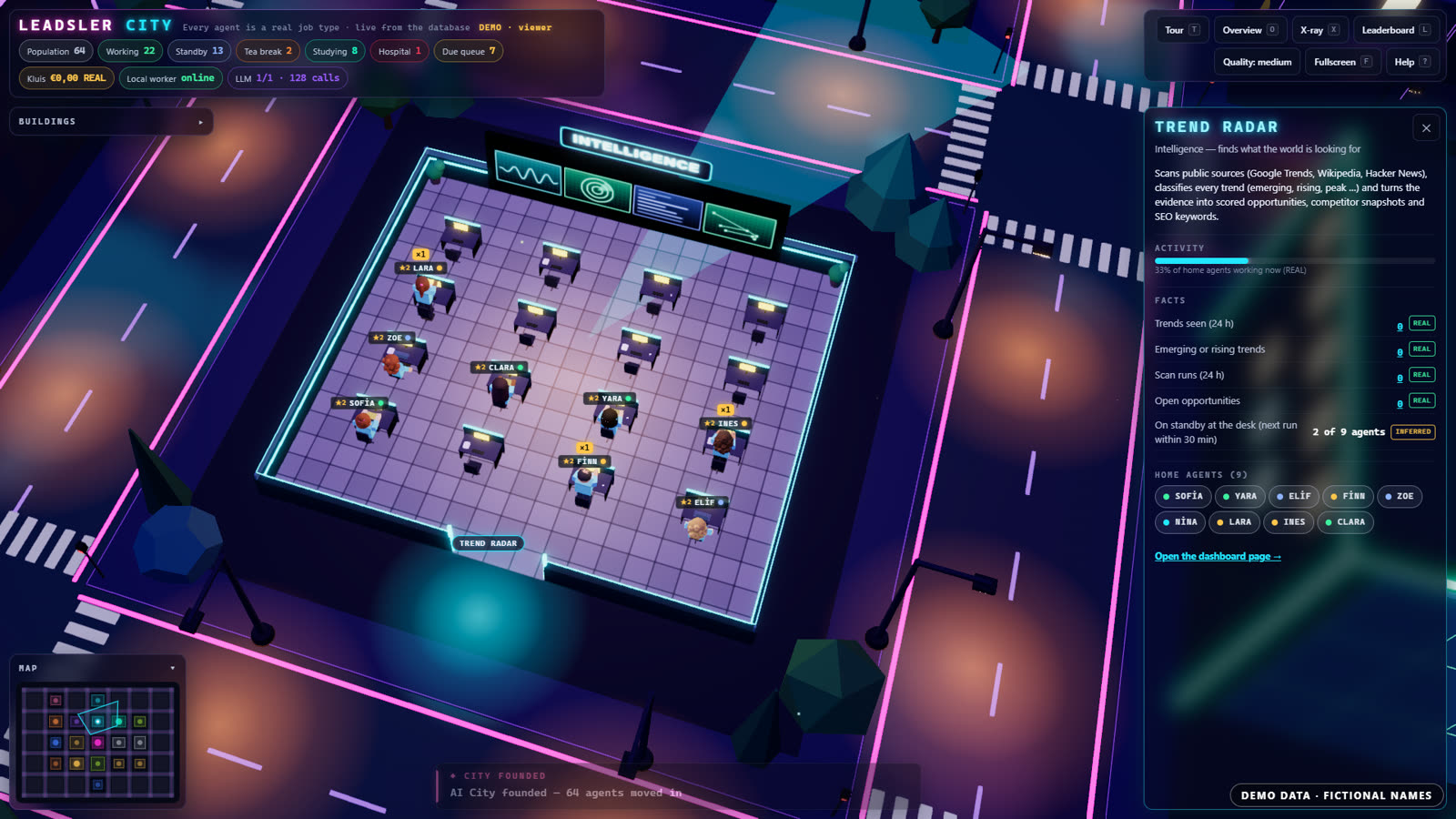
  - Click a citizen or building to open a side panel with its real stats (runs, success rate, streak, last duration, level/XP with the formula shown, recent events).
- **Performance:**
  - 60 fps on a mid-range laptop with 100 citizens: instanced meshes, shared materials, one shadow-casting light or none.
  - A Quality toggle (low/medium/high) that changes pixel ratio, bloom and shadows.
  - Pause rendering when the tab is hidden.
- **Accessibility:** every number in the 3D view is also in the HUD or panel as text. Keyboard works everywhere, and `prefers-reduced-motion` disables camera swoops.

## 5. Game layer (honest)

- **XP** = successful runs × 10 + streak bonus. The formula is visible in the panel.
- **Levels** have friendly titles (Intern → Junior → Specialist → Senior → Lead → Legend).
- **Badges** for real milestones: first 100 runs, a 50-run streak, a week without failures.
- No fake progress, no random rewards.

## 6. Milestones (stop after each one)

1. **M1: Static city from demo data.** The demo generator plus the full `CityState`, the 3D world, the HUD, the camera modes and the DEMO badge. Tests: reducer and generator unit tests. I can screenshot it.
2. **M2: Live ingest.** The token-protected `/api/ingest`, the event store, the privacy filter, the reducer and SSE or polling. Tests:
   - privacy: secret-looking fields never reach the store or the API;
   - auth;
   - "city down → agent unaffected".
3. **M3: Claude Code hookup (or adapter B).**
   - The settings snippet and a README section.
   - A dry-run script that replays a recorded session against a local server.
   - Me watching a real session move through the city.
4. **M4: Polish.**
   - The tour, x-ray and leaderboard.
   - The quality toggle and performance pass.
   - Empty and offline states ("No activity yet — start a Claude Code session").
   - A one-command start (`npm run city`).
5. **M5 (only if I chose a server):**
   - Deploy behind a login with HTTPS. Configuration comes only from environment variables.
   - Backups of the event store.
   - A short `DEPLOY.md`.

## 7. Definition of done

- `npm test` is green and `npm run build` is clean.
- `README.md` explains setup, the hooks snippet, privacy rules and how to switch demo/live.
- Screenshots of the overview, x-ray, a building close-up and an agent panel go in `docs/`, all in demo mode with the badge visible.
- No prompt text, tool input, path or secret appears anywhere in the store, logs, API or UI. Prove it with a test that sends an event full of fake secrets and asserts they are gone.The screenshots show Leadsler’s own AI City running on demo data with fictional names. Your city shows your own agents.
Good to know
- It runs on your own computer by default. Claude Code uses your own Claude plan or API key; the city itself needs no AI calls.
- Plan an evening for the first city on demo data and a weekend for the live connection and polish. It depends on your setup.
- Check what Claude Code writes before you run it, as with any code, and keep the city’s token out of your repository.